
Anatomy of a production RAG system
The components you'll build and where quality and cost are actually determined.
A RAG system has more moving parts than "search + LLM." Understanding what those parts are—and how they interact—helps you design systems that work reliably and debug them when they don't.
This chapter maps out the major components of a production RAG system. We'll go deeper into each one in later modules; the goal here is to see the whole picture so you know where everything fits.
The two pipelines
Every RAG system has two distinct pipelines that share a common index.
The ingestion pipeline runs when content changes. It takes your raw content (documents, articles, database records, whatever you're working with), processes it into a searchable representation, and stores the result. This pipeline runs in the background, often on a schedule or triggered by content updates.
The retrieval pipeline runs when a user asks a question. It takes the query, searches the index for relevant content, ranks and filters the results, and returns what the model should use as context. This pipeline runs synchronously and needs to be fast—users are waiting.
The index sits between these pipelines. The ingestion pipeline writes to it; the retrieval pipeline reads from it. Getting the index representation right is crucial because it determines what the retrieval pipeline can find.
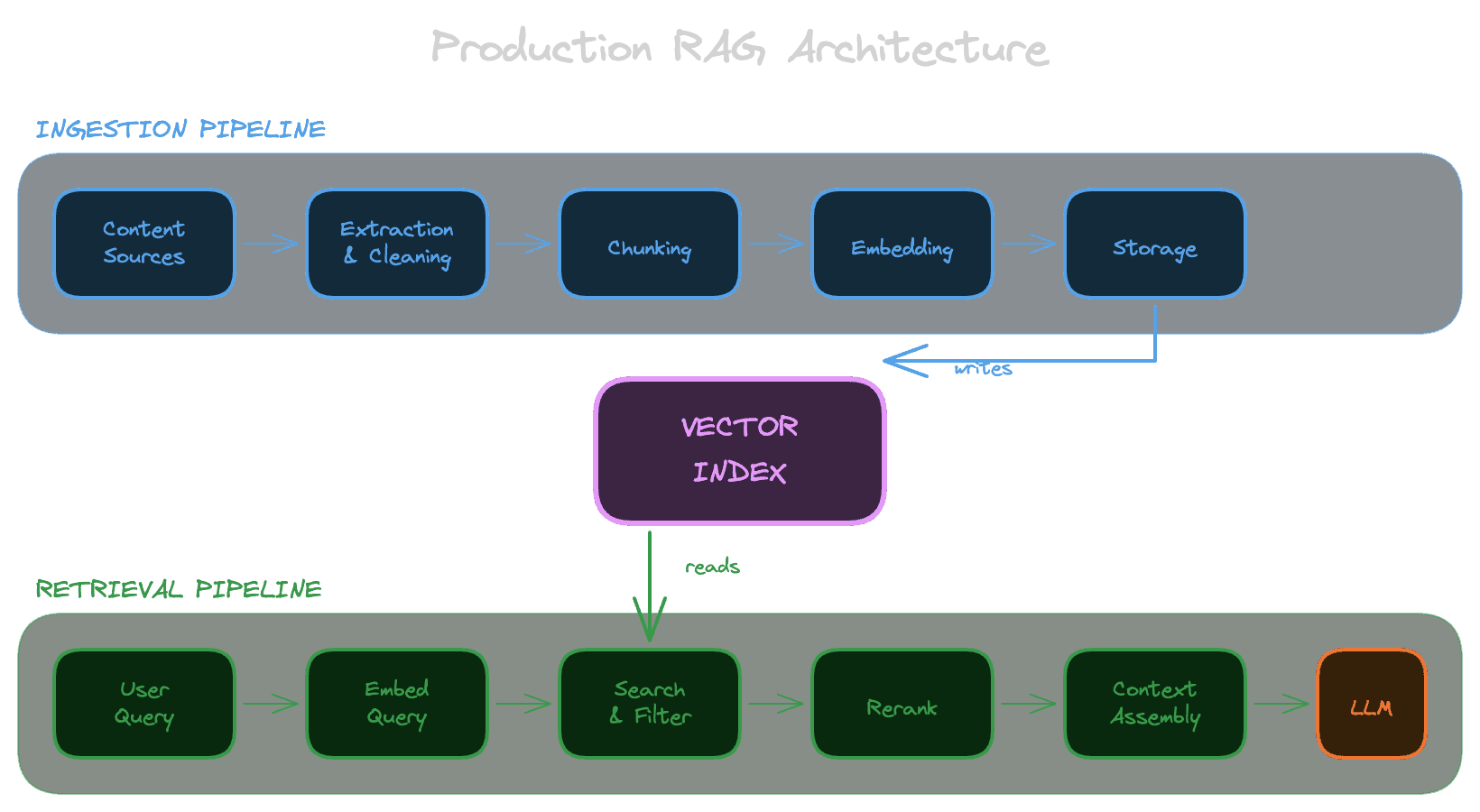
Inside the ingestion pipeline
The ingestion pipeline transforms raw content into something you can search. Let's walk through each stage:
Content sourcing
Decide what goes into your knowledge base. This might be documentation from a CMS, support tickets from Zendesk, product data from a database, or files from Google Drive. Each source has its own format, update frequency, and access patterns.
With Unrag, you can use built-in connectors for Notion and Google Drive, or ingest from filesystem.
Extraction
Handle content that isn't plain text. PDFs need text extraction (or OCR, or LLM-based extraction). Images might need captions. Audio and video need transcription. The quality of extraction directly affects retrieval quality—if you can't extract the text accurately, you can't search it accurately.
Unrag provides extractors for PDFs, images, audio, video, and various file formats.
Cleaning and normalization
Remove noise and standardize formatting. Real content has navigation elements, boilerplate, duplicate sections, and formatting artifacts. Cleaning this up before indexing improves retrieval precision. Normalization ensures consistent structure so your chunking and embedding behave predictably.
Chunking
Split documents into smaller pieces. Embedding models and LLM context windows have limits, but more importantly, smaller chunks let you retrieve specific information rather than entire documents. How you chunk—by sentences, paragraphs, sections, or semantic boundaries—significantly affects what queries can find what content.
Learn more about chunking concepts and how to configure it in Unrag.
Embedding
Convert text chunks into vectors: arrays of numbers that represent semantic meaning. Similar texts produce similar vectors, which is what makes semantic search work. The embedding model you choose affects both quality (what counts as "similar") and cost (API calls add up).
Unrag supports multiple embedding providers including OpenAI, Cohere, Voyage, and others. See model selection guide.
Storage
Write the chunks and their embeddings to your index. This is typically a vector database or a traditional database with vector search capabilities. The storage layer also holds metadata (source URLs, timestamps, permissions) that you'll need for filtering and attribution.
Unrag uses Postgres with pgvector and provides adapters for Drizzle, Prisma, and raw SQL.
Inside the retrieval pipeline
The retrieval pipeline finds relevant content for a user's query. Here's how it works:
Query processing
Prepare the user's input for search. At minimum, this means embedding the query using the same model you used for documents. More sophisticated systems might rewrite ambiguous queries, expand abbreviations, or decompose complex questions into sub-queries.
Candidate retrieval
Search the index for chunks whose embeddings are similar to the query embedding. This is usually approximate nearest neighbor search: fast but not perfectly accurate. You retrieve more candidates than you'll ultimately use, because later stages will filter them down.
In Unrag, this is the retrieve() method with configurable topK and thresholds.
Filtering
Remove candidates the user shouldn't see. This is where access control happens. If a user doesn't have permission to view a document, chunks from that document shouldn't appear in their results—even if they're semantically relevant. Filtering can also apply business logic: only show content from certain sources, only show recent content, etc.
See metadata filtering and permissions for implementation with Unrag.
Reranking
Re-score the candidates using a more sophisticated relevance model. Vector similarity is a useful first pass, but it's not a precise measure of relevance. Rerankers (cross-encoders or LLM-based) look at the query and each candidate together to make better relevance judgments. This is more expensive than vector search, which is why you do it on a filtered candidate set rather than the whole index.
Unrag provides a built-in reranker powered by Cohere.
Context assembly
Take the top-ranked candidates and format them for the LLM. This involves decisions about how many chunks to include, how to order them, whether to include metadata like source URLs, and how to handle cases where you don't have good matches.
See Use with chat for examples of building prompts with retrieved context.
The generation step
Once you have context, you build a prompt and call the LLM. This step is technically outside the RAG system—it's your application's responsibility—but it's worth noting what matters here.
Prompt design tells the model how to use the context. Do you want it to answer only from the provided context? Should it cite sources? What should it do if the context doesn't contain an answer? These instructions significantly affect output quality.
Citation and attribution links answers back to sources. Users want to verify information; you want to debug incorrect answers. The model needs to be told to cite, and your UI needs to display those citations usefully.
Refusal behavior handles cases where retrieval didn't find good matches. If the model doesn't have relevant context, it should say so rather than hallucinate. This requires both prompt instructions and potentially logic that checks retrieval quality before calling the LLM at all.
The feedback loop
Production systems need visibility into how well they're working. This means:
Logging captures queries, retrieved chunks, and generated responses. You need this data to debug individual failures and to understand aggregate behavior.
Evaluation measures retrieval and generation quality against ground truth. Without evaluation, you can't tell whether changes improve or degrade the system.
Monitoring tracks quality metrics over time and alerts when they degrade. Content changes, user behavior shifts, and models update—monitoring catches regressions before users report them.
Where quality is determined
Looking at this system, you can see that quality is determined at multiple points:
Ingestion quality sets the ceiling. If your chunking splits important information across chunks, or your extraction misses key content, retrieval can't recover. Garbage in, garbage out.
Retrieval quality determines what context the model sees. If retrieval returns irrelevant chunks or misses relevant ones, the model is working with the wrong information.
Generation quality determines how well the model uses the context. Even with perfect retrieval, the model can misinterpret, hallucinate, or ignore the information you provided.
Debugging a RAG system means figuring out which stage is failing. The techniques for each are different, which is why later modules treat them separately.
Next
Now that you can see the components, the next chapter helps you match them to specific use cases. Different products need different RAG architectures.