
Metadata, filtering, and permissions
Retrieval is part of your security boundary—design metadata and filters accordingly.
Embeddings and chunks give you semantic search. Metadata gives you everything else: the ability to scope searches to specific collections, filter by document properties, enforce permissions, and trace results back to their sources. Without metadata, you have a flat index that returns whatever is semantically similar. With metadata, you have a system that respects your application's structure.
What metadata is for
Metadata is information attached to chunks that isn't part of the embedded content. It typically includes:
Source identification tells you where a chunk came from. This might be a document ID, a URL, a file path, or a reference to an external system. You need this to display source links, handle updates (re-ingest a document by ID), and delete content when the source is removed.
Classification describes what kind of content the chunk represents. Is it documentation, a support ticket, a knowledge base article, a code file? Classification enables scoped searches where users or features only search specific content types.
Temporal information captures when content was created, modified, or ingested. This enables freshness filtering (prefer recent content) and debugging (understand when content entered the index).
Ownership and permissions record who can access the content. This might be a tenant ID, a list of user IDs or groups, or a reference to an external permission system. This is the foundation of access control.
Custom attributes capture domain-specific properties. Product category, language, author, confidence level—whatever matters for your application.
Filtering before vs after retrieval
There are two places you can apply filters: before retrieval (the filter is part of the vector search query) or after retrieval (you filter the results in application code).
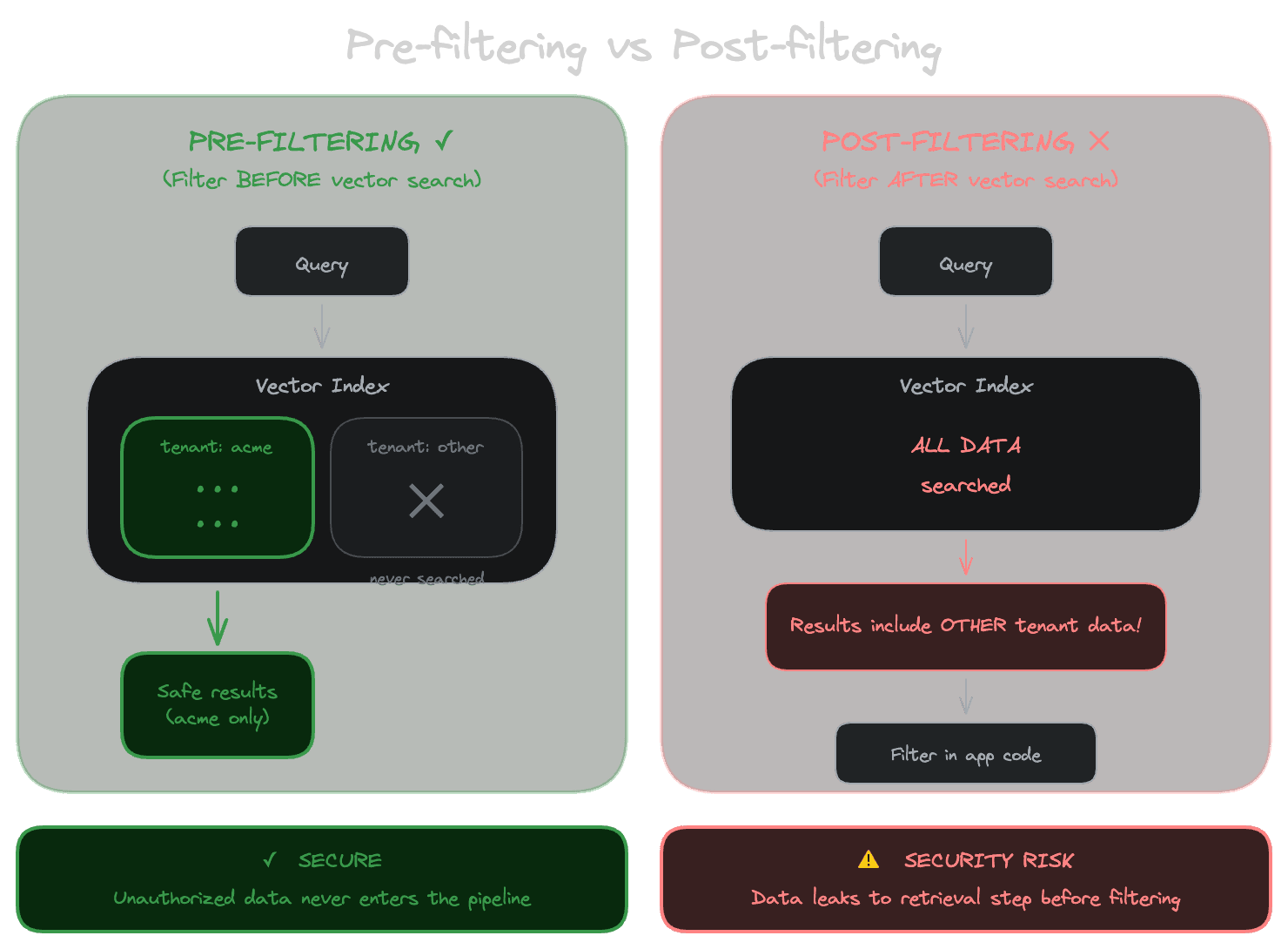
Pre-filtering is almost always what you want. The database applies the filter criteria while searching, so you only get results that match both the semantic query and the filter. This is efficient and doesn't leak information.
Post-filtering retrieves semantically similar results first, then filters them. This seems equivalent but has problems. First, if many of the top-K results don't pass the filter, you might end up with too few results or no results at all. Second, if you're filtering for permissions, post-filtering means the database returned results the user shouldn't see—even if you filter them before display, they've touched your application layer, creating audit and security concerns.
Most vector databases support pre-filtering with varying degrees of efficiency. The implementation affects performance: some systems filter first (reducing the search space but potentially missing results), some search first then filter (more complete but potentially slower), and some use hybrid approaches. Understand how your database handles filtered searches if you're building for scale.
Permissions are a retrieval concern
This point deserves emphasis: access control must happen at the retrieval layer, not just at display. If a user isn't allowed to see certain documents, your retrieval system shouldn't return chunks from those documents, period.
The alternative—retrieving everything and filtering in the application—creates several problems. The model might see content it shouldn't (if you're including retrieved chunks in prompts). The retrieved content might leak through logging, caching, or debugging interfaces. You're trusting application code to always filter correctly, and bugs in that code create security vulnerabilities.
For simple permission models (all users see all content, or content is scoped by tenant), encoding the scope in metadata and filtering during retrieval is straightforward. For complex permission models (per-document ACLs, group-based access, inherited permissions), you might need to integrate with your permission system at query time or pre-compute which users can access which documents.
The key principle is: never retrieve content the user can't access. This is easier to enforce consistently if you implement it as a hard constraint in the retrieval layer rather than a check you have to remember to apply everywhere.
Stable identifiers
Every chunk should have a stable identifier that doesn't change when you re-ingest the content. This enables several important operations:
Updates without duplication. When a document changes, you want to update its chunks in the index, not create duplicate chunks from the new version. Stable identifiers let you upsert: insert if new, update if existing.
Deletion. When a document is removed from your source system, you need to remove its chunks from the index. You can only do this if you know which chunks came from that document.
Audit and debugging. When a user reports a bad answer, you need to trace back to what content was retrieved. Stable identifiers let you find the exact chunks that contributed to a response.
A common pattern is to derive chunk identifiers from document identifiers plus position: if the document ID is doc-123 and this is the third chunk, the chunk ID might be doc-123:chunk-2. This ensures chunks are traceable to their source and update correctly when content changes.
Designing your metadata schema
Think about what operations you'll need to support:
What scoping do users or features need? If you have documentation search and support search as separate features, you need metadata that distinguishes documentation from support content.
What permissions matter? For multi-tenant applications, tenant ID is essential. For applications with document-level permissions, you need to represent who can access what.
What filters will improve result quality? If recent content is more valuable, store timestamps. If certain content types should rank higher, store content type.
What do you need for debugging and audit? Source URLs, ingestion timestamps, and version identifiers help you understand where content came from and when.
Start with the metadata you know you need and add more as requirements emerge. Metadata is easier to add than to remove, so err on the side of capturing information even if you're not sure you'll use it.
With Unrag: Attach metadata via engine.ingest({ metadata: {...} }) and filter via engine.retrieve({ scope: {...} }). See metadata and scoping for patterns, and the multi-tenant guide for tenant isolation.
Next
With metadata enabling filtering and permissions, the next chapter explains how vector indexes work and how to tune them for your performance requirements.