
Answer formats and product UX
Snippets vs answers vs reports - choose formats that match user intent and evaluation.
The format of your answer shapes how users perceive and use it. A one-sentence snippet feels different from a detailed explanation, which feels different from a structured report with sections. The right format depends on what users need, how much context they have, and what they'll do with the answer. Format also affects how you evaluate quality—measuring whether a snippet is "correct" differs from measuring whether a report is comprehensive.
Format archetypes
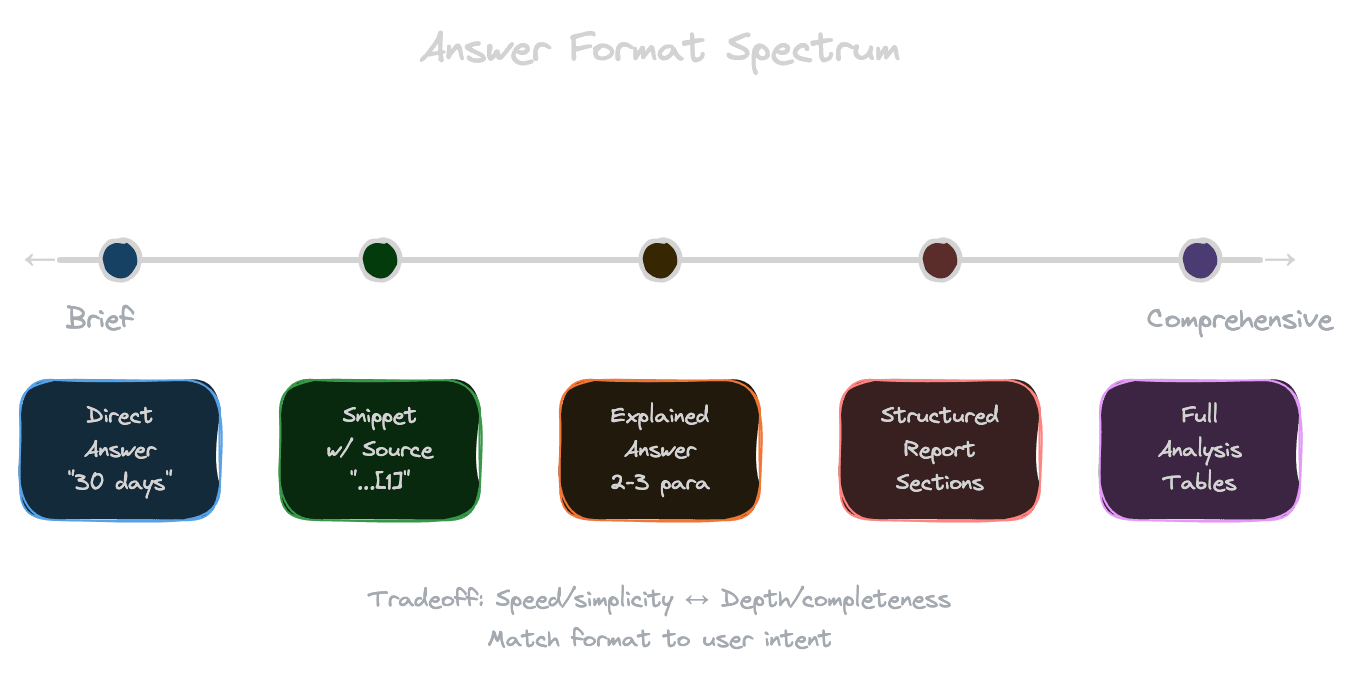
Different RAG products use different answer formats, each with distinct characteristics.
Direct answers provide a single, specific response: "The return window is 30 days." These work for factual questions with clear answers. They're easy to evaluate (right or wrong) but fail when questions are nuanced or require explanation.
Explanatory answers provide context and reasoning: "The return window is 30 days from purchase. This applies to most products, but electronics have a 15-day window. You'll need your receipt or order confirmation." These serve users who want to understand, not just know.
Snippets with sources show extracted passages from documents without synthesis: "From Refund Policy: 'Returns are accepted within 30 days...' From FAQ: 'Electronics have a shorter return window of 15 days.'" These maximize transparency but put synthesis burden on the user.
Structured reports organize information into sections, tables, or lists. Useful for complex queries that span multiple topics. These feel authoritative but require more generation time and tokens.
Conversational responses feel like chatting with a knowledgeable colleague. They may include hedging, suggestions, and follow-up questions. These build engagement but can feel less authoritative.
Matching format to user intent
Users come with different needs, and the right format depends on their intent.
Quick fact-checking needs direct answers. A user asking "What's the deadline for X?" wants a date, not an essay. Verbose responses feel frustrating.
Learning and understanding benefits from explanation. A user asking "How does X work?" wants context, not a one-liner. Terse responses feel unhelpful.
Research and analysis needs comprehensiveness. A user asking "What are the pros and cons of X?" wants a thorough treatment, possibly structured. Incomplete responses feel superficial.
Decision support needs actionable structure. A user asking "Should I choose X or Y?" wants a comparison, maybe a table, with a recommendation. Unstructured prose makes comparison harder.
You can infer intent from query patterns, user roles, or explicit product design. An executive dashboard might default to summaries; a research tool might default to detailed reports.
Format and trust
How you present information affects whether users trust it.
Citations build trust by making answers verifiable. Even users who don't check citations feel more confident when they're present. The presence of sources signals "this came from somewhere real."
Structure signals thoroughness. A well-organized answer with clear sections feels more authoritative than a wall of text. It suggests the system understood the question's complexity.
Hedging can build or erode trust depending on context. "I'm fairly confident that..." might feel appropriately cautious or might feel like the system doesn't really know. Match hedging to your product's tone.
Showing sources inline (not just citations, but actual excerpts) maximizes transparency. Users can evaluate the quality of evidence themselves. This is valuable for high-stakes decisions but adds visual complexity.
Format and evaluation
How you format answers affects how you measure quality.
Direct answers have clear correctness criteria. The answer is right or wrong. This makes automated evaluation possible: compare to gold-standard answers.
Explanatory answers are harder to evaluate automatically. You need to assess both correctness and quality of explanation. Human evaluation or LLM-as-judge becomes important.
Structured formats can be evaluated structurally. Did the response include all expected sections? Did the comparison table have all criteria? This enables partial credit.
Consistency matters for evaluation. If your format varies unpredictably, measuring quality becomes harder. Enforce format constraints in your prompts to get comparable outputs.
Guiding format through prompts
You can control answer format through explicit instructions.
Specify length: "Answer in 2-3 sentences" or "Provide a comprehensive response with at least 3 paragraphs."
Specify structure: "Structure your response with sections: Summary, Details, Next Steps" or "Present your answer as a bulleted list."
Provide examples: Show the model what a good response looks like in your preferred format.
Use format tokens: Some applications use special tokens or JSON schemas to enforce structured output.
Test format compliance. Models don't always follow format instructions perfectly, especially for complex structures. Validate and fall back gracefully.
Speed versus completeness tradeoffs
Format choices affect latency and cost.
Short answers are faster to generate and cheaper in tokens. For high-volume applications, this matters. A 50-token answer costs less than a 500-token report.
Streaming makes long answers feel faster. Even a comprehensive response feels responsive if text appears progressively. But users still wait for complete information.
Progressive disclosure can help: show a short answer immediately, with an option to expand. This serves quick scanners and deep divers alike.
Consider user patience. Internal tools for experts might tolerate longer responses; consumer products need snappy interactions.
Next
Format establishes how a single response looks. The next chapter covers multi-turn chat—how to maintain quality across a conversation without retrieval degradation.